Google Ads UTM Parameters
Google Ads UTM Parameters Campaign Type (for navigat...

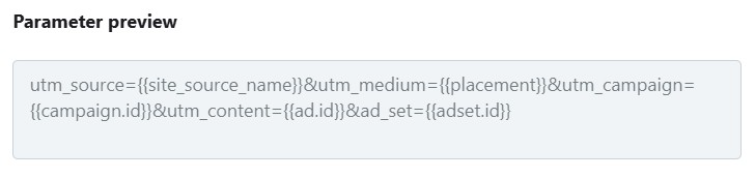
Final UTM Preview: *This applies to all ads that direct a user to the website.
| UTM Parameters | |||
| Field | UTM Parameter | Value | Example |
| Campaign Source | utm_source | {{site_source_name}} | fb (Facebook), ig (Instagram), msg (Messenger), an (Audience Network) |
| Campaign Medium | utm_medium | {{placement}} | ig_feed, fb_feed, etc |
| Campaign ID | utm_campaign | {{campaign.id}} | Campaign ID |
| Ad ID | utm_content | {{ad.id}} | Ad ID |
| Ad Set ID | ad_set | {{adset.id}} | AD Set ID |
Following are the steps:
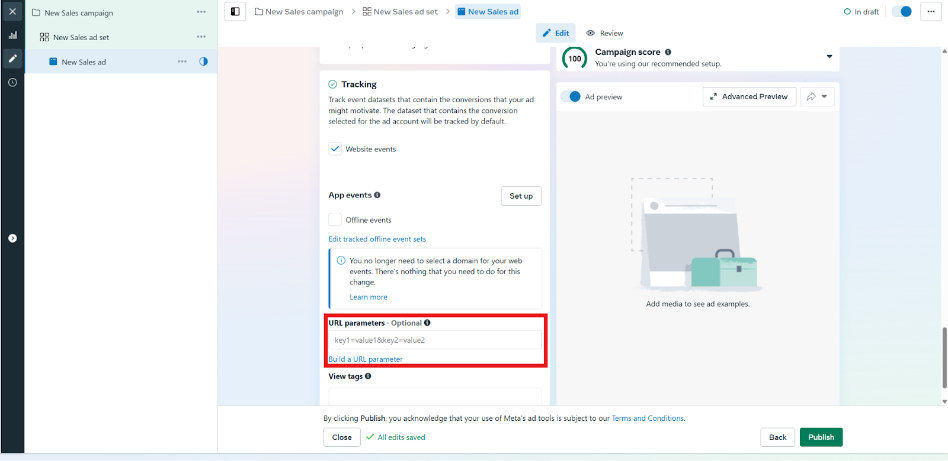
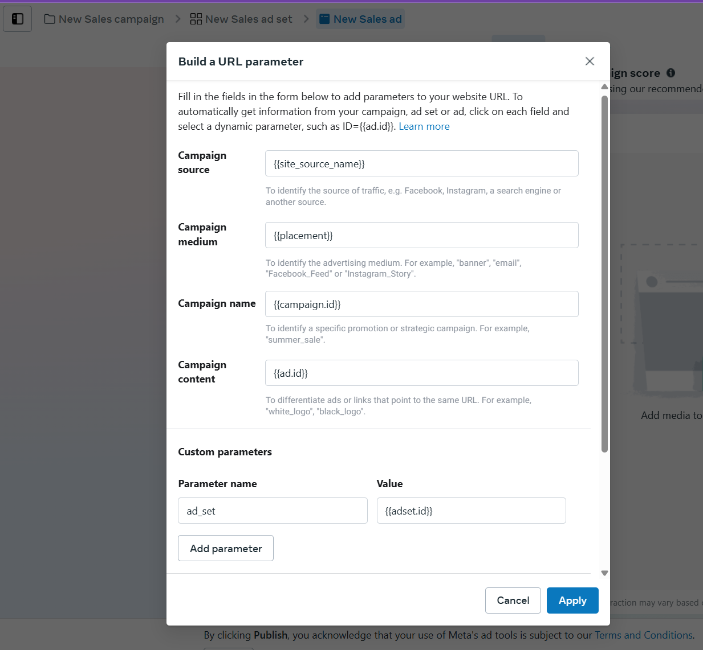
Step 2:Mention the following dynamic parameters in the URL Parameter Builder, as shown in the image below.
| Campaign source: | {{site_source_name}} |
| Campaign medium: | {{placement}} |
| Campaign name: | {{campaign.id}} |
| Campaign content: | {{ad.id}} |
| ad_set: | {{adset.id}} |
Preview: utm_source={{site_source_name}}&utm_medium={{placement}}&utm_campaign={{campaign.id}}&utm_content={{ad.id}}&ad_set={{adset.id}}